
Turn OSINT into executive-ready briefings in minutes
Stop spending eight hours a week pulling, reading, and rewriting open-source intelligence into a board memo. Report Studio synthesizes thousands of articles, filings, and signals into a structured, citation backed briefing — in the time it takes to make coffee.
Built on the Semantic Visions OSINT engine — monitoring tens of millions of companies across 12 languages.
The manual briefing problem
Every Monday morning, someone on your risk, compliance, or intelligence team is doing the same thing: accessing 12 different sources, skimming press releases, cross-checking regulatory feeds, copy-pasting paragraphs into a Word doc, and trying to compress all of it into a briefing the leadership team will actually read.
It works, until it doesn't. Manual briefings have three structural flaws:
They miss what matters.
A single analyst can read maybe 50–80 articles in a working day. Your exposure spans thousands of companies across dozens of jurisdictions. The signal you need is statistically unlikely to be in the 80 articles you happened to read.
They don't cite.
When a CRO asks "where did this number come from?" the answer is usually "I'll find it." That's not a defensible audit trail under DORA, NIS2, or any serious compliance regime.
They don't scale.
Adding a second analyst doesn't double output — it doubles overhead. Real coverage requires automation.
An automated OSINT report
engine inside svEye
You define the focus. It does the analyst work.
Synthesizes thousands of sources in one pass
Feed Report Studio a collection, a saved search, a CSV of entities, or a query. It deduplicates, ranks, and processes the 500, 5,000 or more most relevant document chunks — across articles, filings, and signals harvested from 12 languages, inside a closed environment with sources fully under our control.
Grounded citations for every claim
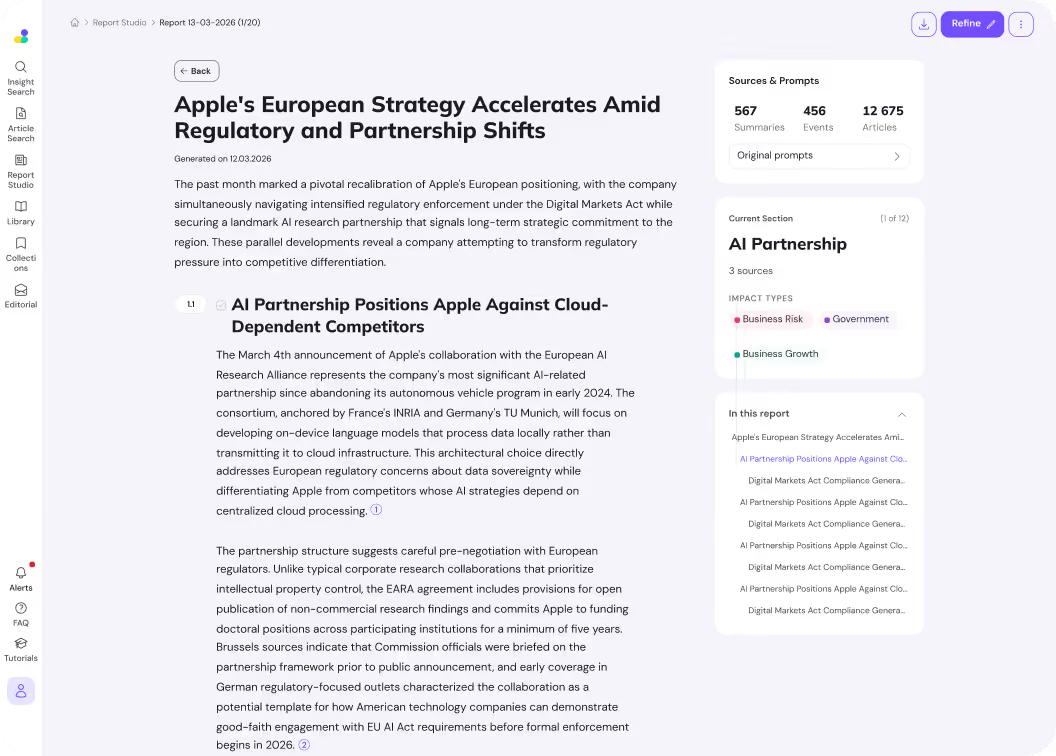
Every paragraph is grounded in the underlying source articles — no hallucinated quotes, no missing footnotes. Sources are processed through a consistent data structure (source domain, harvested date, language, entity tags), so when a finding is challenged you click straight through to the original document.
Outputs in your structure, not its own
Need an executive digest with a decision table? A multi-tier supplier risk dashboard? A regulatory exposure matrix? Define the structure once in the prompt. Report Studio produces the same shape every time — ready for the board pack, the audit file, or the client deliverable.
From prompt to briefing — and refined in place
Define focus and sources
Select the input set: a saved collection, a search across the svEye corpus, or an uploaded CSV of companies, ports, or entities. Write the focus prompt — what should the report cover, what timeframe, what angle.
Automated retrieval and synthesis
Report Studio expands your query into up to 20 targeted sub-queries, retrieves the highest-relevance document chunks, and processes them in batches through purpose-built language models. Tune precision and recall via chunk size, expansion breadth, and retrieval depth.
Receive a structured, cited briefing
The finished report lands in your Report Studio library with full citation provenance, executive structure, and download-ready formatting. Refine in place, share with the team, or export.
Refine section by section
Don't like one paragraph, table, or section? Refine it in place — regenerate just that part with a new instruction, swap the structure, or tighten the angle. No need to re-run the whole report or start a new generation from scratch.
What teams use Report Studio for
The weekly board briefing.
Generate a structured digest of material risk events across your portfolio — credit, market, operational, geopolitical — with a one-page executive summary and an evidence table behind it. Replaces 6–8 hours of analyst aggregation per week.
The audit-defensible exposure report.
Produce periodic compliance reports for DORA, NIS2, CSDDD, and AML/KYC programs. Every claim cites the source article, source domain, and date — the audit trail is built into the output, not retrofitted.
The multi-tier supplier briefing.
Run a report over your tier 1–N supplier set and surface emerging distress signals, regulatory actions, and disruption events across the network. Pair with svChain for full multi-tier coverage.
The sector and thesis brief.
Synthesize media signals, regulatory developments, and corporate events across a sector or watchlist into an investment-grade briefing. Pair with svMarkets for sentiment-alpha overlays.
How Report Studio compares to ChatGPT, Perplexity, or a manual analyst
Anyone can ask a general-purpose AI to "write a report on supply chain risk." Almost no one can verify the result. That's the difference.
It is an analyst-grade synthesis engine running on a proprietary OSINT corpus, with engineering choices that prioritize verifiability over fluency.
Retrieval, gathering, synthesis
In the retrieval stage, your prompt is expanded into up to 20 semantically targeted sub-queries, each used to embed-search your input documents. Up to 400 chunks — each up to 2,000 characters — are selected as the working set. More queries and higher top-K means broader coverage; fewer means tighter precision and lower cost.
In the gathering stage, retrieved chunks are processed in configurable batches by extraction models that surface only the information relevant to your focus. Citation links to source chunks are maintained throughout. Smaller batches typically extract more signal per chunk; larger batches reduce cost.
In the synthesis stage, the gathered findings are composed into the final markdown report by a reasoning model, with optional structure prompts that enforce specific section layouts, decision tables, or formatting. The result is a deterministic, citation-backed document — ready to read, share, or export.
"Report Studio is aware of source domain, harvested date, and current date. When you constrain a report to a time window, the model honors it — and you can verify it."

12
Languages
6000+
docs / run
Frequently asked questions.
Report Studio runs on the Semantic Visions OSINT corpus — tens of millions of companies monitored across hundreds of thousands of sources in 12 languages. You can also bring your own input: collections, saved searches, or CSV uploads of entities.
Every claim in a Report Studio output is linked back to the source chunk and the source article. Citations include the source domain and the harvested date, so you can audit, verify, or follow up directly.
Yes. You can leave structure to the model (default), or provide an explicit structure prompt — section headings, decision tables, fixed formats. Many teams build a library of structure prompts for recurring deliverables.
Typical runs complete in 3–12 minutes, depending on input size and configuration. Compare to 4–8 hours of manual analyst work for a comparable briefing.
Inputs in 12 languages. The output language follows your prompt — write the prompt in English for an English report, or in the language of your deliverable.
The engine is aware of source harvested date and current date. To enforce a specific time window, filter your input documents to that window — this is the most reliable way to constrain temporal scope.
Yes, within the tunable parameters. Same input set, same prompt, same configuration → consistent structure and findings. The platform is engineered for audit-grade reproducibility, not stochastic output.
Report Studio is a feature of svEye. svEye integrates with risk and compliance stacks through the platform's broader API and partner integrations.
Stop reading.
Start reporting.
Try Report Studio inside a free 30-day svEye trial. No credit card. Full access.

